Month in Pixels: A Simple Guide to Visual Mood Tracking
Make a free printable month in pixels mood tracker. Choose your month and week start, print on A4 or Letter, or save as PDF. No signup. Includes a how-to guide.

A month in pixels is a mood tracker with one square for each date. You choose a small colour key, fill a square to summarise the day, and gradually build a picture of the month. A pixel mood tracker can be as simple as thirty numbered boxes on paper.
Use the free printable monthly mood tracker below to make a bullet journal spread without drawing the calendar. Choose a month, year, and Monday or Sunday start, then print your sheet or save it as a PDF. No signup is required.
Make your printable · See a filled-in example · Try a digital mood tracker
Free printable month in pixels
Make a monthly mood tracker sheet for your bullet journal, planner, or wall. No email or account needed.
Choose A4 or Letter, portrait, and turn off browser headers and footers. To keep a PDF, select “Save as PDF” in the print dialog. On a phone, use your browser’s Print or Share menu if needed.
Month in pixels
January 2026
How did this day feel overall? One square, one day.
| Mon | Tue | Wed | Thu | Fri | Sat | Sun |
|---|---|---|---|---|---|---|
| — | — | — | 1 | 2 | 3 | 4 |
| 5 | 6 | 7 | 8 | 9 | 10 | 11 |
| 12 | 13 | 14 | 15 | 16 | 17 | 18 |
| 19 | 20 | 21 | 22 | 23 | 24 | 25 |
| 26 | 27 | 28 | 29 | 30 | 31 | — |
- 1 Rough
- 2 Low
- 3 Steady
- 4 Lifted
- 5 Bright
Choose your own colours in the key, or write 1–5 in each square. Blank means no entry. A dash means the date is outside this month.
A few dated notes
What would I like to remember about this month?
How to use your printable mood tracker
- Choose the month, year, and first day of the week above.
- Select Print or save as PDF, then choose A4 or Letter paper in portrait orientation. Turn off browser headers and footers.
- Give the five labels colours of your choice, or use their numbers with one pen. The blank sheet works in black and white.
- Fill one dated square each day. Leave unrecorded days blank; cells with a dash are outside the month.
Print a fresh sheet each month, keep it in a planner, or scale it down in your print settings to paste into a bullet journal. This is a printable calendar, not a fillable PDF or a spreadsheet download. Your mood entries stay on your paper; this tool does not collect or store them.
Prefer your monthly spread on your phone?
Oubaitori lays out the month for you. Choose one of five mood ratings each day and return to a monthly view of what you recorded. You can also enable Sleep, Gratitude, Highlight, and other trackers for more context.
See Oubaitori’s digital mood tracker →
A simple guide to your month in pixels
The useful part is having something to return to. An ordinary Tuesday gets a place. So does a difficult Friday. A day you didn't record can stay blank.
Here is how to make your first one, including a sample month that leaves room for real life.
Month in pixels or year in pixels?
A monthly layout gives you 28, 29, 30, or 31 dated squares. You can arrange them like a calendar or in a compact numbered grid. It leaves room nearby for a few notes and lets you try the practice without drawing a whole year.
A year in pixels puts all twelve months together. In Camille's July 2017 first-person account for Bullet Journal, she describes a grid with months in columns and days running down the page, filling a daily square from a five-colour key. Her account explains her personal journaling practice; it is not a study of a mental-health treatment.
For a yearly grid with 31 rows, cross out dates that do not exist, such as 31 April. Keep those distinct from dates you simply did not record.
Choose a month if you want a small starting point and space for context. Choose a year if seeing many months together appeals to you. Neither layout requires you to start on 1 January. If you begin halfway through a month, mark your start date and leave earlier dates unrecorded.
Choose a legend you can use without much debate
Start with a few labels that describe how the day felt overall. Five is one workable choice, not a scientifically required number. This example uses the labels in Oubaitori's mood tracker:
| Number | Label | Example colour | A possible meaning for you |
|---|---|---|---|
| 1 | Rough | Muted coral | A particularly difficult day |
| 2 | Low | Pale peach | More down than usual |
| 3 | Steady | Soft ochre | Mostly ordinary or neutral |
| 4 | Lifted | Pale sage | Generally positive |
| 5 | Bright | Green | A particularly good-feeling day |
These meanings are starting suggestions. On paper, you can use your own words and colours. Write the key beside the grid so you can read it later, and add numbers or symbols if colours are hard to distinguish. One pen and five numbers work too.
Try to keep the same meanings for the month. If you change the key, date the change. Otherwise, a colour shift might reflect a new definition rather than a different experience.
Reserve an empty square for no entry. It is not a sixth mood and does not mean neutral, sad, or bad.
Record one square per day
Choose a question before you start: “How did this day feel overall?” is a reasonable option. Another is “How do I feel at this evening check-in?” Either can work, but they record different things. Write your choice above the grid and use it consistently.
At a convenient moment, such as when you put your phone down for the evening:
- Find today's date.
- Choose the closest label without trying to calculate a perfect average.
- Colour the square or enter its number.
- If useful, write a dated phrase nearby: “Slow morning; dinner with Sam.”
That phrase is optional. Keep it short enough that a check-in still feels manageable. You do not have to explain or justify every rating.
What if the day held more than one feeling?
A good conversation can happen during a sad day. You can also feel glad and sad at the same moment. In Larsen and McGraw's experiments on mixed emotions, participants reported simultaneous happiness and sadness in response to bittersweet film material. That supports the possibility of mixed feelings; it does not establish a best way to compress a day into a rating.
For a simple tracker, keep one overall rating and add a note about the mix when you want to preserve it. “Glad to see everyone; sad to say goodbye” tells you more than the colour alone.
On paper, you could instead split a square between two colours, provided your key explains what the split means. The e-wellbeing emotion-tracker worksheet also allows more than one colour for a day. That is a format option, not a feature assumed to exist in every app.
Do not automatically assign mixed days the middle rating. Neutral and bittersweet can feel quite different.
An ordinary sample month, including the gaps
This is an invented 30-day month, arranged in date order rather than weekday columns. Each filled square shows the date and the chosen rating. A dash marks an unfilled square. The asterisks point to notes below; they are annotations for this example, not extra mood categories.
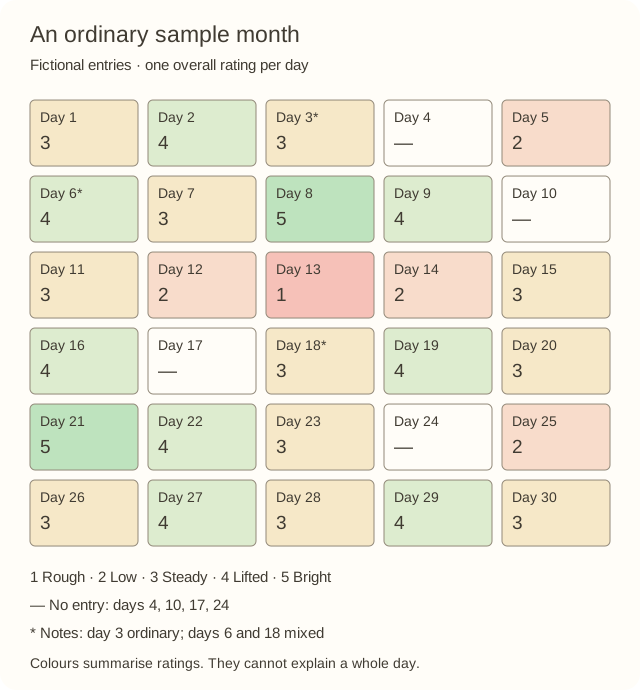
The same dates and ratings are available as text below.
| 1: 3 | 2: 4 | 3: 3* | 4: — | 5: 2 |
| 6: 4* | 7: 3 | 8: 5 | 9: 4 | 10: — |
| 11: 3 | 12: 2 | 13: 1 | 14: 2 | 15: 3 |
| 16: 4 | 17: — | 18: 3* | 19: 4 | 20: 3 |
| 21: 5 | 22: 4 | 23: 3 | 24: — | 25: 2 |
| 26: 3 | 27: 4 | 28: 3 | 29: 4 | 30: 3 |
- Day 3, Steady: “Groceries, work, quiet evening.” An ordinary day has a recorded rating.
- Day 6, Lifted: “Happy about the visit; sad when it ended.” The note preserves mixed feelings behind a positive overall rating.
- Day 18, Steady: “Nervous morning, lovely afternoon.” The same rating as day 3 represents a different experience, including feelings that changed over the day.
- Days 4, 10, 17, and 24: no entries. We do not know how those days felt.
- Day 13, Rough: a recorded difficult day, visibly different from a gap.
The grid records 26 chosen daily summaries and four missing entries. It cannot reveal unrecorded moods, the full range of feelings within a day, or what caused a rating. The notes supply context that the colours cannot carry.
There is no need to turn this into a score. You might notice the lower ratings around days 12–14 and wonder what was happening. Without notes, the honest answer may be that you do not remember.
Make your first tracker on paper
Use a notebook page, a ruler if you want one, and whatever pens you already have.
Draw one square for each date in the month. Number them, put the legend beside them, and leave a small margin for dated notes. You can copy the five-column layout above; it does not need to line up with weekdays. Write the month and year at the top.
If you prefer a calendar layout, mark the weekday headings and place the first date under the correct day. Cross out unused cells so they do not look like missing entries.
Keep the page somewhere you will encounter it. Decoration is optional. You can add it if you enjoy it, but the tracker is ready as soon as the dates and key are clear. Our guide to bullet journaling explains how a mood page can fit into a wider notebook practice.
Set up a digital pixel mood tracker
A basic spreadsheet is enough. Make three columns: date, rating, and optional note. Enter each date for the current month, leave ratings empty until you record them, and use conditional formatting to give values 1–5 their colours. Keep empty cells uncoloured. If you want a square grid, arrange the dated cells in five or seven columns and keep notes on a separate sheet keyed by date.
An app can handle the monthly layout for you. Oubaitori's mood tracker uses one daily rating from Rough to Bright in a monthly pixel grid, with monthly reflection and no streak system. Enable Mood among your trackers, open the current month, and choose today's rating.
The current Oubaitori mood entry stores the rating, without an attached note field. If you want extra context, keep a dated note separately. The split-colour squares and asterisks in the paper examples are optional notebook conventions, not app controls.
Choose the format that fits where you already pause to reflect. Paper gives you freedom over the key and layout. Digital tools can save the work of redrawing the month.
Missing days can stay missing
If you miss a check-in, return at today's date. Leave the earlier square blank when you do not remember the day clearly. A guess added for the sake of a complete pattern makes the page harder to interpret later.
On paper, if you choose to add a remembered entry afterwards, mark it as retrospective. In an app, follow its date-editing rules; do not assume every past date is editable.
An empty square tells you there is no recorded mood. It does not tell you why. You might have been busy, away from your notebook, or simply uninterested in recording that day. There is no need to fill in a story for the gap either.
Look back with one small question
At the end of the month, read the notes as well as the colours. Pick one question:
- Which day would I like to remember in more detail?
- Did similar ratings hide very different experiences?
- Was this key easy to use, or would different words fit better next month?
A cluster of colours can give you something to explore, but the grid alone cannot establish a cause or diagnose a condition. Treat it as a personal record with limits.
For your first check-in, draw or open today's square, choose the closest label, and stop there if that is enough. The month can take shape one recorded day at a time.
Explore Oubaitori's mood tracker →
Sources
- Camille (2017). Year in Pixels. First-person background on the journaling format.
- Larsen, J. T., & McGraw, A. P. (2011). Further Evidence for Mixed Emotions. Experiments on simultaneous happiness and sadness, not pixel tracking.
- e-wellbeing. Emotion tracker worksheet. A practical example of a monthly key and multiple-colour option.